Access diagnostic mode from the scooter's touchscreen directly without ADB.
In addition to launching the diagnostic application via an ADB shell, you can access the onboard diagnostic suite directly from the scooter’s touchscreen interface without requiring a computer or active ADB connection.
Change Vehicle Operation Mode
Section titled “Change Vehicle Operation Mode”The scooter’s MoveOS interface evaluates the current vehicle operation mode to determine how access to the diagnostic application is authorized:
- Customer Mode (
2/cust): The HMI displays a dynamic QR code containing an encrypted challenge intended solely for authorized service center technician software. - Manufacturing Mode (
1/mfg) or Service Mode (3/service): The HMI bypasses the dynamic QR challenge and falls back to a static PIN code prompt directly on the touchscreen keypad.
Before launching diagnostic mode from the touchscreen, switch the vehicle operation mode using s1util.py:
python s1util.py set-operation-mode --host <scooter-ip> [mode]Supported Operation Modes
Section titled “Supported Operation Modes”| Value | Mode | Description |
|---|---|---|
1 or mfg |
Manufacturing | Factory mode; enables static PIN entry for diagnostics |
2 or cust |
Customer | Standard consumer mode; enforces dynamic QR challenge |
3 or service |
Service | Service center mode; enables static PIN entry for diagnostics |
Example Usage
Section titled “Example Usage”python s1util.py set-operation-mode --host <scooter-ip> mfgLaunching Diagnostic Mode from HMI
Section titled “Launching Diagnostic Mode from HMI”Once the operation mode has been set to Manufacturing or Service mode, trigger the diagnostic screen directly from the dashboard:
-
Unlock the Scooter: Power on and unlock your scooter to reach the main MoveOS home screen.
-
Navigate to Ride Stats: Swipe left twice across the touchscreen to navigate to the Ride Stats screen.
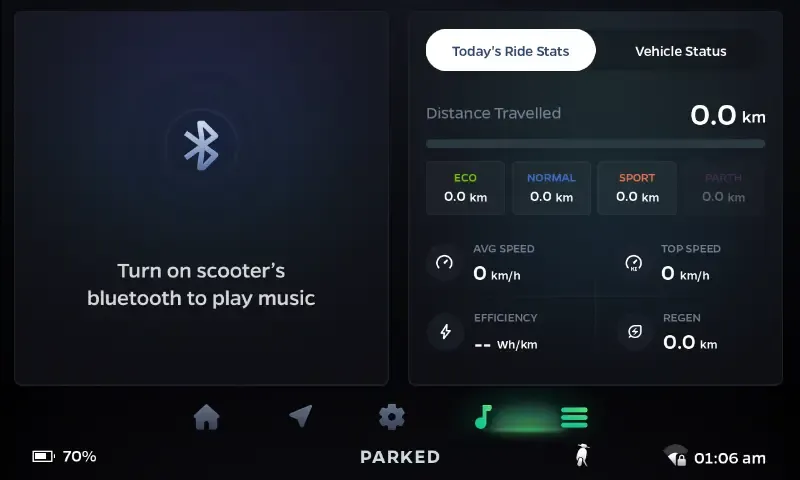 Navigate to the Ride Stats screen on the dashboard.
-
Tap Regen Stats 6 Times: Locate the Regen stats card on the display and tap it 6 times.
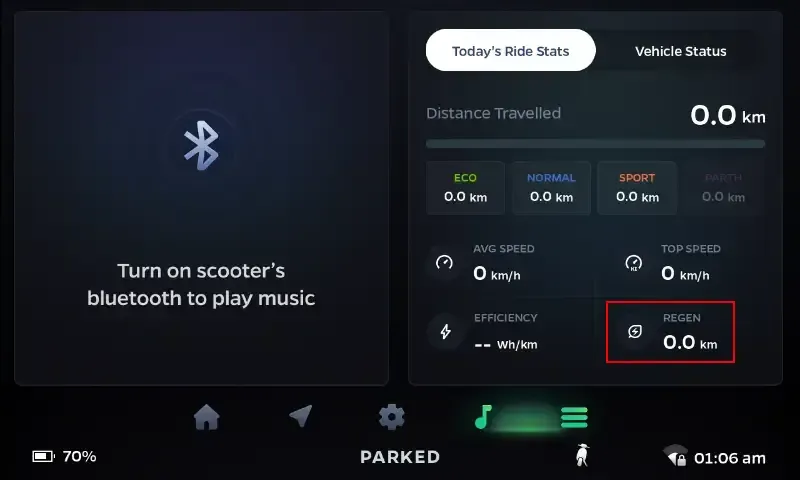 Tap the Regen stat box 6 times to open the PIN entry dialog.
A PIN keypad modal will open on the touchscreen.
-
Enter the Static PIN: Enter the passcode
560095.Because the scooter is operating in Manufacturing or Service mode instead of Customer mode, the HMI verifies this static factory PIN rather than demanding dynamic QR authentication.
-
Diagnostic Mode Opens: The factory diagnostic interface (
com.ola.mfgapp) will launch immediately on the dashboard display, allowing you to test vehicle hardware.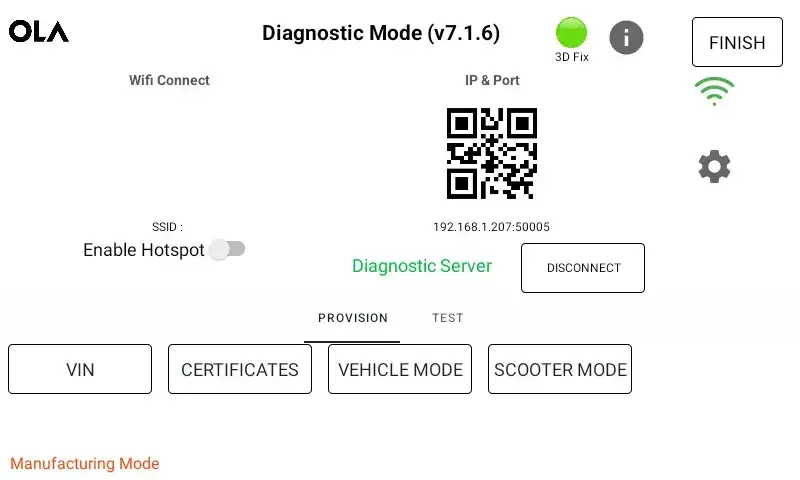 The onboard diagnostic mode interface.